


MICO: Go Live Streaming & Chat
4.27.06K Reviews
App Specs
- Version
- 9.1.3.2
- Updated On
- License
- Free
- Downloads
- 50,000,000+
- Developer
- Mico World
- Categories
- Social
- Platform
- Android
Screenshots




 Analysis by AppCompare
I approached MICO: Go Live Streaming & Chat as a social app rather than simply another place to watch live video. Its main appeal is the combination of streaming, chat, and meeting people, but the experience depends heavily on how comfortable you are with fast-moving social spaces. I found it most interesting when I treated it as a window into live conversations instead of expecting a carefully organized community platform.
That distinction matters. MICO is made by Mico World and sits in the social category, with a mature audience rating of 17+. It is free to install, although optional in-app purchases range from twenty-nine cents to just under one hundred dollars per item. The app has been available since June 2014, and its current version is 9.1.3.2 for devices running Android 7.0 or later. Those details make it accessible to a wide range of Android users, but the mature rating is an important reminder that this is not an app I would casually hand to a child or treat like a simple messaging tool.
How the interface feels when reading and navigating
The first thing I noticed is that a live-streaming app asks for a different kind of attention from a conventional social network. Instead of quietly browsing a fixed feed, I was moving between live rooms, profiles, chat messages, and reactions. The content changes quickly, so readability is not only about whether text is large enough; it is also about whether I can understand what is happening before the screen moves on.
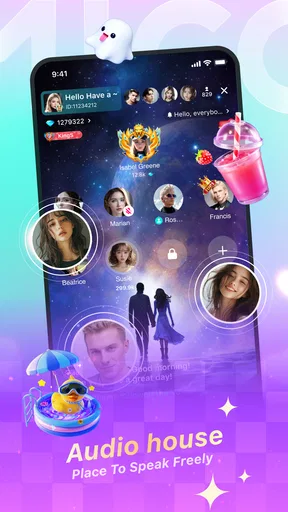
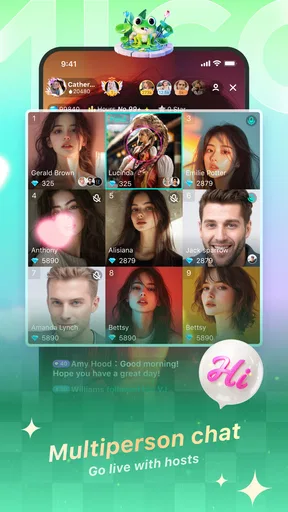
MICO’s basic concept is easy to grasp. I can look for live broadcasts, enter a room, watch, and decide whether to participate. That simple path is helpful for someone who does not want to build a profile or learn a complicated set of tools before seeing any value. The challenge begins once several conversations compete for attention. A host may be speaking while messages appear and other viewers interact, creating a dense visual and social layer.
For me, the best way to navigate was to slow down rather than trying to follow everything. I would enter a stream, watch for a short while, and decide whether the host’s style suited me before writing anything. This is a more comfortable workflow than opening several rooms at once. It also reduces the chance of misreading a fast conversation or reacting to a message without understanding its context.
People who prefer clear menus and predictable timelines may find the live format less comfortable than ordinary social apps. A traditional messaging service is usually better when I need to find one person, review a conversation, or return to a specific message. MICO is more spontaneous, and that spontaneity is part of its charm, but it also means that information can feel temporary and easy to miss.
I would also recommend checking the screen in the environment where you expect to use it. Live video is easier to follow when there is enough light and when the phone is held at a steady distance. In a dim room, on a small display, or while walking, the combination of moving video and chat can become tiring. This is not a flaw unique to MICO, but the app’s design makes the issue more noticeable than it would be in a text-first network.
Worth Reading Before You Choose

Flipboard Shows What News Apps Must Do Beyond the Feed

Switching to Android Auto Means Rethinking Your Driving Routine

Google Calendar Makes a Crowded Week Easier to Manage

Ludo King Makes the Most of the Minutes Between Plans

Baby Panda World Brings Quick Play to Modern Phones, but Its Game Library Feels Busy

ESPN’s Live Game View Makes Following Close Games Easier
Making the first session less overwhelming
My practical advice is to begin as a viewer. There is no need to start broadcasting or joining conversations immediately. Watch how rooms work, notice how quickly people respond, and learn which parts of the screen carry the information you care about. This gives new users a chance to understand the social rhythm without the pressure of performing for an audience.
Another useful habit is to choose one purpose before opening the app. I might use it to watch a live personality, look for casual conversation, or meet people with similar interests. Without that small goal, it is easy to keep switching between rooms and finish the session feeling that I saw plenty but connected with nobody.
The app’s popularity suggests that this format has broad appeal: it has an average rating of 4.2 from around 756 thousand ratings and more than 50 million installs. I would not treat those figures as proof that every user will find the interface comfortable, but they do show that MICO has reached a large audience and that live social interaction is a familiar use case for many people.
Motor and sensory considerations in live interaction
Live chat can demand more physical precision than it first appears. Tapping a room, opening a profile, sending a message, and reacting at the right moment may require repeated small movements. For someone with limited dexterity, tremors, or fatigue in the hands, the problem is not necessarily one difficult action; it is the number of quick actions that can accumulate during a busy session.
I found that typing less made the experience easier. Short messages are more realistic in a fast room anyway, and they reduce the need for extended keyboard use. If I wanted to say something more thoughtful, I would wait until the conversation slowed rather than trying to compete with a rapid stream of comments. This is a small adjustment, but it turns MICO from a constant tapping exercise into a more manageable viewing experience.
Voice and video also change the accessibility picture. A user with hearing difficulties may not be able to follow a host’s speech reliably if the room depends mainly on audio. A user with visual sensitivity may find moving faces, changing content, and active chat distracting. I would not choose MICO as my primary social space if I needed every conversation to be available in a calm, text-centered format.
On the other hand, people who find long written conversations tiring may appreciate the immediacy of live video. Seeing a person speak can make social interaction feel more natural than composing a carefully written message. Someone who struggles with the pressure of one-to-one conversation might also prefer entering a room as a quiet viewer before deciding whether to participate.
This is where personal settings and phone-level tools become important. I would use the device’s text-size, display, sound, and touch-assistance options where available, but I would not assume that changing the operating system solves every problem inside the app. Enlarging text can help with reading, yet it may also leave less room for chat and video. Reducing touch precision can make accidental taps less likely, but it may slow down participation in a fast room.
There is a real trade-off between visibility and social speed. A larger display can make chat easier to read and controls easier to hit, while a smaller phone is more portable for spontaneous use. For users with low vision or limited hand control, a tablet-sized screen may be more comfortable at home, even though it is less convenient for moving around. I would test MICO in the setting where I actually plan to use it instead of judging it only on a quick installation.
When live video helps and when it gets in the way
In my experience, the live format works best when I have enough concentration to watch and listen. It is not ideal when I am cooking, commuting, or trying to divide attention between several tasks. A missed sentence in a normal message can be reread; a missed moment in a live room may simply be gone. That makes the app more demanding for anyone who needs extra processing time.
At the same time, MICO can be useful for people who want low-pressure exposure to social interaction. I can enter a room, observe the tone, and leave without having to maintain a conversation. That viewer-first approach is a meaningful strength for shy users, people learning how online communities work, or anyone who wants company without committing to a long exchange.
Using MICO in different everyday situations
A realistic use case is an evening at home when I want social contact but do not have the energy for a planned call. I can browse a live room, listen for a few minutes, and write one or two comments if the atmosphere feels welcoming. This is more immediate than scrolling through old posts, and it can feel more personal than reading a static feed.
Another situation is a short break during the day. MICO can fill that gap with live content, but I would be careful about opening it when I have a fixed appointment or a task that requires concentration. Live rooms encourage “just one more minute” behavior because the content is always happening now. Setting my own stopping point before entering is a surprisingly useful discipline.
For someone with unreliable internet access, live streaming may be less dependable than text messaging. Video consumes attention and relies on a stable connection to remain enjoyable. I would choose a conventional chat app when the priority is sending a message that the other person can read later. I would choose MICO when the priority is presence, discovery, and the possibility of joining an active conversation.
Travelers and people who enjoy meeting strangers may find the app more rewarding than a closed circle of friends. The open-ended nature of live rooms creates opportunities to encounter personalities I would not find through my existing contacts. The trade-off is that unfamiliar social spaces require more judgment. I would avoid sharing private details early, and I would leave any room that makes me uncomfortable rather than feeling obliged to stay polite.
The mature 17+ rating should shape how families think about the app. I see MICO as an adult-oriented social environment, not a supervised youth platform. Parents looking for a controlled way for children to communicate should choose a service designed specifically around family safety and known contacts instead. The rating alone does not tell me how every room will feel, so I would treat it as a firm boundary rather than a suggestion.
How it compares with familiar alternatives
Compared with a standard messaging app, MICO is less efficient for private, deliberate communication but stronger for spontaneous discovery. Compared with a conventional social feed, it places more emphasis on the present moment and less on carefully edited updates. Compared with a video-call service, it is more open-ended: I can browse live rooms instead of arranging a call with people I already know.
That makes the choice fairly clear. If I need reliable contact with family, searchable messages, or a predictable conversation, I would use a messaging service. If I want to watch live personalities and possibly meet new people without scheduling anything, MICO makes more sense. If I want a polished broadcast with minimal interaction, a video platform focused on watching may be calmer. MICO’s identity sits in the middle, where viewing and participation overlap.
The app is free to download, which lowers the barrier to trying it. However, the presence of purchases from twenty-nine cents to nearly one hundred dollars per item means I would be cautious around any paid interaction or virtual spending. I would not add payment details until I understood exactly what an optional purchase does for my experience, and I would use device-level purchase controls if several people share the phone.
Remaining barriers and practical boundaries
The biggest barrier is not a single missing button; it is the intensity of the environment. Fast chat, live audio, video, and social pressure can combine into a difficult experience for users who need quiet interfaces, extra time, or highly predictable navigation. MICO can be approached gently, but it cannot be turned into a completely calm, text-only network simply by changing how I use it.
There is also a social barrier for anyone uncomfortable with public participation. Even when I only intend to watch, the presence of hosts and other viewers can create pressure to comment, react, or spend money. I think the healthiest approach is to decide in advance what participation means for me. Watching silently is valid, and leaving a room is always preferable to staying because of guilt or momentum.
Privacy judgment is another important part of using an open social app. I would keep early conversations general, avoid sending identifying information, and be skeptical of requests that move too quickly toward money or private contact. These are sensible habits anywhere strangers meet online, but they matter more in a service built around live access and immediate interaction.
Users should also consider whether their phone is comfortable for extended video sessions. Older supported devices may technically run the app while still feeling less pleasant for long viewing, especially if the screen is small or the user relies on enlarged text. Since the minimum requirement is Android 7.0, compatibility is broad, but compatibility does not guarantee that every device offers the same level of comfort.
I would skip MICO if my main goal were a tightly controlled community, a distraction-free reading experience, or communication limited to people I already know. I would also avoid making it my only social outlet if live interaction causes sensory overload or if I need conversations to remain available for later review. In those cases, a slower and more structured alternative is likely to serve me better.
My inclusive verdict
MICO works best for adults who enjoy live video, casual conversation, and the possibility of meeting unfamiliar people. I like that I can begin quietly, sample different rooms, and decide how much interaction I want. The app’s strongest quality is immediacy: it feels closer to dropping into an active social space than browsing a collection of finished posts.
Its limitations are equally clear. The moving content can be hard to follow, quick interactions may be physically tiring, and audio-led rooms are not equally comfortable for every user. The mature audience rating, open social setting, and optional high-value purchases also mean that I would use it with firm personal boundaries rather than treating it as harmless background entertainment.
For accessibility, my view is practical rather than absolute. MICO can fit different abilities and situations when I use it at my own pace, rely on device-level display and touch tools, keep messages short, and choose quieter moments. It is less suitable when I need complete control over timing, a purely text-based experience, or a carefully limited audience.
With an average rating of 4.2 and more than 50 million installs, the app clearly has a substantial audience, but popularity is not the same as universal comfort. I would recommend trying it free of charge, beginning as a viewer, and setting spending and time boundaries before becoming active. MICO is worth considering when live connection matters more than perfect predictability. For readers who want a slower, more private, or more structured social tool, I would honestly point them elsewhere.
Pros
- Large international community with many active live rooms.
- Private messaging makes it easy to continue conversations after streams.
- Virtual gifts provide interactive ways to support favorite broadcasters.
- Profile discovery tools help users find people with similar interests.
- Available on both Android and iOS for convenient cross-platform access.
Cons
- Some features and interactions depend heavily on purchasing virtual coins.
- Public rooms may include mature or unsuitable content despite moderation.
- Frequent notifications can become distracting without careful settings.
- User activity and stream quality may vary significantly by region.
- Privacy-conscious users may dislike the app’s social and profile visibility.
FAQs for MICO: Go Live Streaming & Chat
What is MICO: Go Live Streaming & Chat used for?
MICO is a social live-streaming and chat app where users can watch live broadcasts, interact through comments, send virtual gifts, join conversations, and meet people from different countries. Depending on the available features in your region, you may also find private messaging, audio or video interaction, interest-based communities, and other social discovery tools designed for real-time communication.
Is MICO: Go Live Streaming & Chat free to download and use?
The app is generally free to download, and many of its basic functions, such as browsing public streams and chatting, can be accessed without paying. However, MICO may include optional in-app purchases, virtual coins, gifts, subscriptions, or other premium features. Prices and available services can vary by country, device, account status, and current app-store policies.
Is MICO safe for teenagers and younger users?
MICO is intended for mature audiences, and live social platforms can contain conversations, broadcasts, profiles, or user-generated content that may not be suitable for children. Parents should check the current age rating, privacy settings, and local terms of service before allowing access. Users should also avoid sharing personal information and report suspicious, abusive, or inappropriate behavior.
Do I need to create an account to use MICO?
Some content may be visible before registration, but creating an account is normally necessary for interactive functions such as following broadcasters, sending messages, participating in chats, receiving notifications, or maintaining a profile. Registration may involve an email address, phone number, or supported social-login method. Review the permissions requested during setup and use a strong, unique password.
Does MICO require a strong internet connection, and can it use mobile data quickly?
Because MICO focuses on live video, audio, messaging, and real-time interaction, a stable internet connection provides the best experience. Streaming can consume considerable mobile data, especially when watching broadcasts for long periods or using video features. Wi-Fi is recommended when possible. Performance may also depend on your phone’s hardware, battery level, location, and network quality.


